100+ PROJECTS DELIVERED SINCE 2019HELLO@DATASPECC.COM
HomeWorkHyprcore.ai
Our product · in market

Hyprcore: meeting notes that never leave the laptop

Our own product, on our own P&L. A native desktop app for Mac and Windows that dictates into any text field, records both sides of a call, and turns it into summaries, action items and agent routines, with transcription running locally.

AT A GLANCEHyprcore.ai logo
1,000+users on Mac and Windows
5.0★★★★★across 15+ reviews
17on-device speech models
RELATIONSHIP
Ours: product, roadmap, support
PLATFORMS
macOS (Apple Silicon + Intel), Windows 10/11
CURRENT RELEASE
v1.11, signed and auto-updating
BUSINESS MODEL
Free · Pro $19.99 · Team $39.99
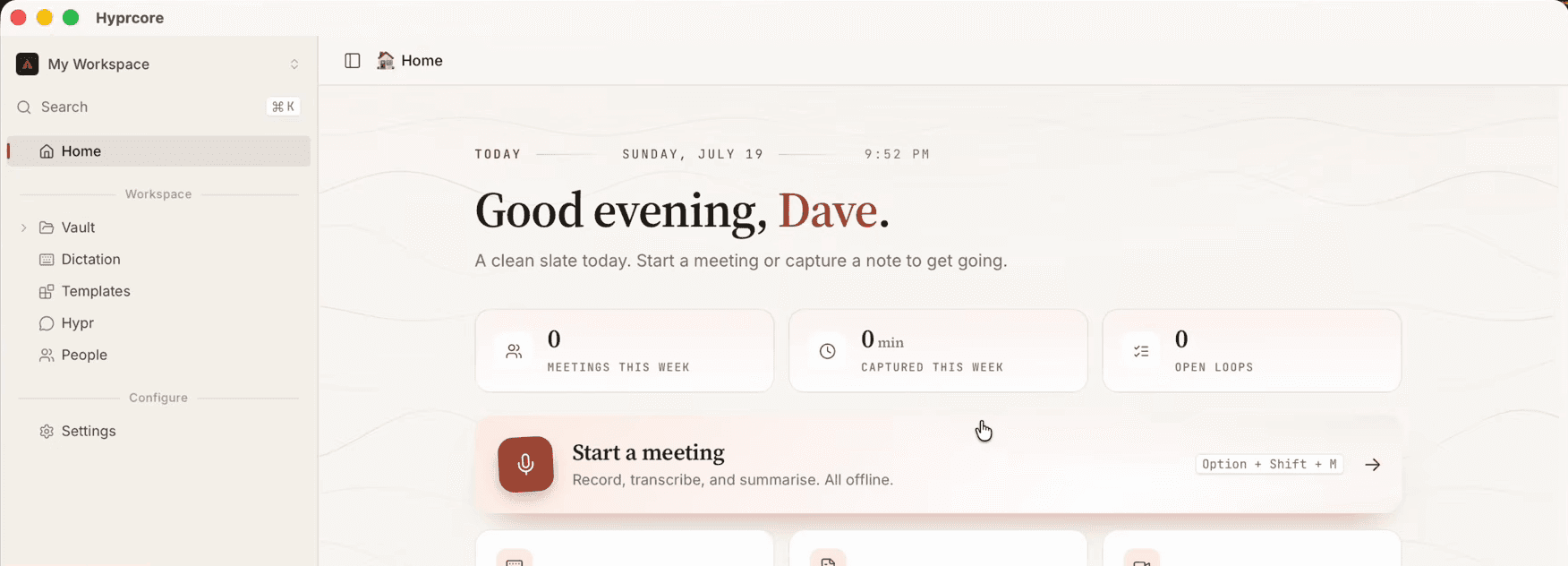
Hyprcore home screen: workspace sidebar, this week's meetings and a Start a meeting action
Home — the vault, dictation, people and routines in one workspace
01

The problem

Meeting bots join the call as a stranger, and cloud notetakers ship every word to someone else's server. For lawyers, founders and anyone under NDA, that rules the category out entirely.

02

What we set out to build

A notetaker with no bot and no upload by default. It captures the call from the operating system itself, transcribes on the user's CPU, and keeps the result as plain files the user owns and can open in anything.

03

What it became

A workspace: push-to-talk dictation, meeting and screen recording, a searchable vault, voice commands, and routines that run on a schedule against Gmail, Outlook and Notion, exposed to Claude and Cursor over MCP.

What we built

One app, six jobs.

Shipped release by release, up to v1.11. We own the roadmap, the support queue and the release train, so every one of these runs on our time and our money.

Dictation into any app

Hold a shortcut, speak, release. The text is typed into whatever field has focus, with word-by-word streaming and a cleanup pass.

Both sides of the call, no bot

Your mic and the call's audio are recorded separately, so the transcript knows which words were yours. Screen video is optional.

Summaries, chapters, action items

Action items come with an owner and a priority, written by Claude through our cloud, the user's own key, or a model running locally.

A vault, not a database

Everything is saved as plain Markdown files on the user's disk. ⌘K search across it all, a one-click Obsidian plugin, and nothing locked in.

Routines

Scheduled agents that read the meetings and act: pre-meeting briefs, follow-up drafts, and commitments closed once they're done.

Works with Claude and Cursor

Claude and Cursor can read the user's meetings, people and action items directly, without the app having to be open.

A recorded meeting in Hyprcore with a summary document, generated chapters and the timestamped transcript
A recorded meeting: generated doc, chapters and the timestamped transcript
Hyprcore Models Library listing on-device speech models such as Canary, SenseVoice and Whisper
Models library: local, Hyprcore Cloud, or bring your own key
Hyprcore live recorder panel raising a low microphone level from 22% to 64% with an undo option
Live recorder: catches a quiet mic and fixes it, with an undo
Architecture

From two audio streams to a clean transcript

The meeting pipeline enforces one rule: the mic is the user and nobody else, and system audio is everyone else. Each stage exists because an earlier version broke it.

  1. STAGE 01Capture

    Your mic and the call’s audio are recorded as two separate tracks, straight from the operating system. No bot joins.

  2. STAGE 02Align

    The two tracks are lined up precisely. A tenth of a second out, and echo removal stops working.

  3. STAGE 03Clean

    Echo, background hum and uneven volume are removed, so both sides sound clear.

  4. STAGE 04Transcribe

    Silence is skipped, then one of 17 on-device models, or the cloud if the user prefers, writes the transcript.

  5. STAGE 05Understand

    Summaries, chapters and action items land in the user’s own files, ready for Claude or Cursor to query.

Engineering highlights

The hard parts, and how we solved them.

The problems that decide whether a product like this ships at all, and what solving each one means for the people using it.

01

Echo cancellation that keeps your voice

Laptop speakers leak the other side of the call into the mic, so the transcript hears everyone twice.

We record your mic and the call's audio as separate tracks, line them up, and strip the echo out, without cutting into your own speech when two people talk at once. Two earlier approaches did one or the other; we shipped only when it did both.

Clean attribution: your words are yours, everyone else's are theirs

02

Recording the call without the scary permission

The usual way to record a Mac's audio asks for Screen Recording access, and many people say no.

Audio-only meetings use a narrower macOS audio permission, and screen access is only requested when someone actually wants video. On Windows the same capture needs no permission at all.

No Screen Recording prompt for audio-only meetings

03

Onboarding that tells the truth

macOS can report a permission as granted when it isn't, and the app then quietly fails.

Hyprcore checks permissions the way the OS itself stores them rather than trusting a cached answer, and watches for the grant instead of waiting on a dialog that can hang.

First run ends with your own words coming back, not a spinner

04

Floats over Zoom, stays out of your screen share

A recorder that steals focus mid-call, or shows up in the deck you're presenting, gets uninstalled.

The recorder, banner and dictation pill are native floating panels that respond to a click without pulling focus from the meeting, and are hidden from screen capture.

Present, take notes and record in the same call

05

Local, cloud or your own key, one switch

Some users want nothing to leave the laptop, others want the best cloud model, and the business needs a paid path.

Every transcription and AI call goes through one router the user controls: local only, cloud only, or somewhere between. The default is our own metered cloud, tied to their plan; their own API keys and local models are always an option.

Privacy for users, a revenue path for the business

06

Accuracy we measure before we market it

Accuracy is the first thing a bad review complains about, and you can't protect what you don't measure.

Transcription and speaker-labelling accuracy are scored automatically against reference recordings, so a model or code change that makes things worse is caught before release, not by users.

Word and speaker error rates tracked on every change
Tech stack

What it runs on.

Chosen per layer: native where the operating system matters, managed where it doesn't, and always with a local option for the AI.

DESKTOP APP
Rust logoRustTauri 2 logoTauri 2React 19 logoReact 19TypeScript logoTypeScriptTailwind CSS logoTailwind CSSSQLite logoSQLite
AUDIO & CAPTURE
ScreenCaptureKit · Core Audio logoScreenCaptureKit · Core AudioWASAPI · Graphics.Capture logoWASAPI · Graphics.CaptureWebRTC AEC3 logoWebRTC AEC3RNRNNoiseSISilero VAD
ON-DEVICE SPEECH
WHwhisper.cppONNX Runtime logoONNX RuntimeNVIDIA Parakeet · Canary logoNVIDIA Parakeet · CanarySHsherpa-onnx
CLOUD SPEECH & LLMS
Anthropic Claude logoAnthropic ClaudeOpenAI logoOpenAIDeepgram logoDeepgramGroq logoGroqOpenRouter logoOpenRouterOllama logoOllama
WEB, BILLING & JOBS
Next.js logoNext.jsSupabase logoSupabaseStripe logoStripeInngest logoInngestPostmark logoPostmarkCloudflare R2 logoCloudflare R2
AGENTS & INTEGRATIONS
Model Context Protocol logoModel Context ProtocolComposio logoComposio
Where it is now

In market, on our P&L.

  • 1,000+ users, with a 5.0 average across 15+ reviews
  • Shipped on macOS, then ported to Windows down to the audio layer, in v1.11
  • Code-signed, notarized and auto-updating on both platforms
  • Paid tiers live on Stripe, with a metered AI proxy behind them
Next case study
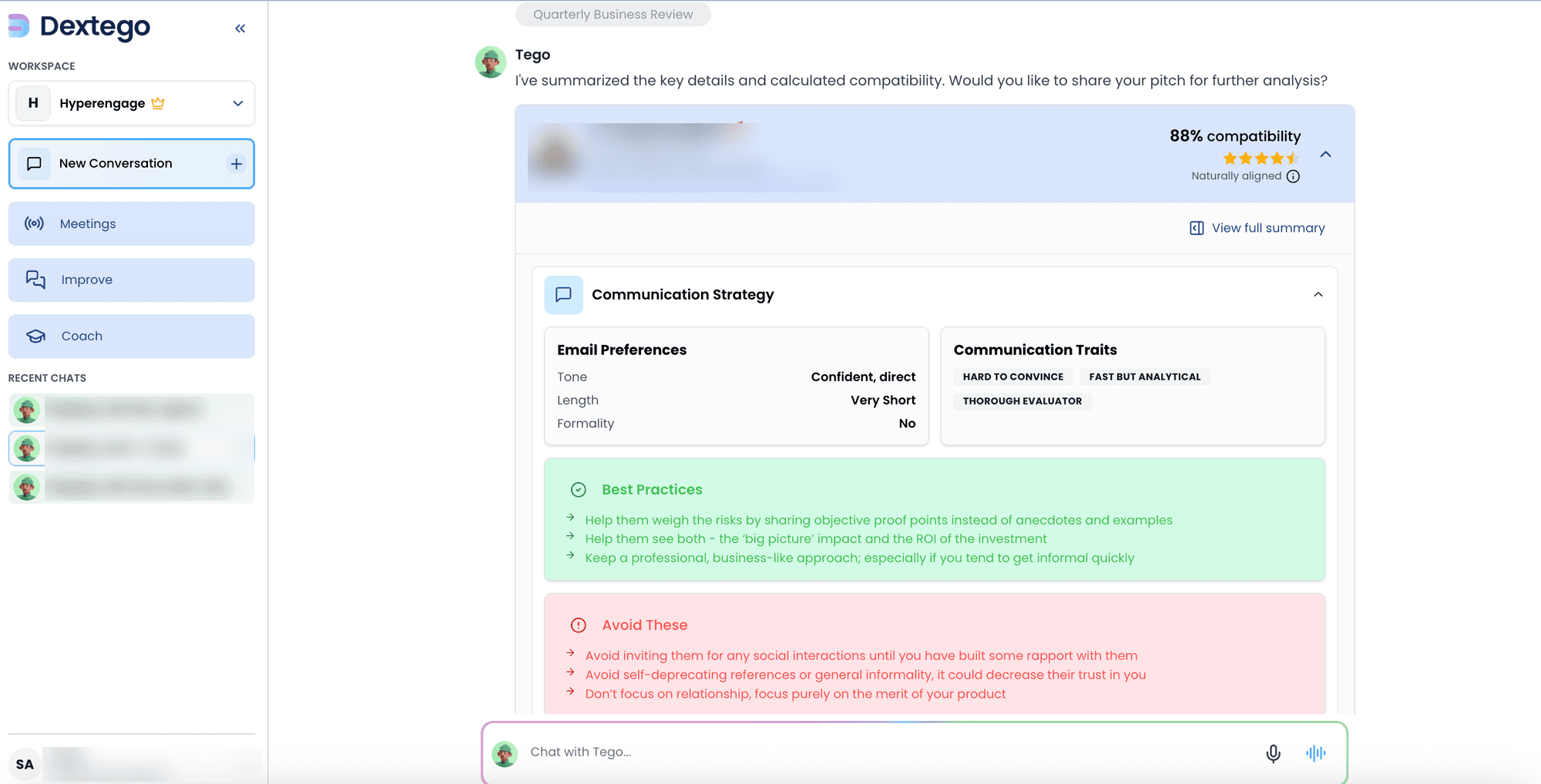
Dextego's Tego coach showing a buyer's compatibility score, email preferences, communication traits and what to do and avoid
Dextego logoDextegoClient build · AI sales coaching

An AI sales coach that sits in every call

A full AI sales-coaching platform: live in-call guidance, roleplay with voice coaches, buyer profiling and post-call scorecards, across a web app, API, Chrome extension and desktop app.

Next.js logoNext.jsNestJS logoNestJSMastra logoMastraOpenAI logoOpenAIRecall.ai logoRecall.aiSupabase logoSupabase
4surfaces: web, API, extension, desktop
5AI coach agents in production
4languages shipped
Read the case study
Built by the same bench

Seen something close?
Let's build yours.

Next step

Tell us what you want built. We'll tell you how we'd do it.

Point at the case study closest to your problem, or just describe it. You'll talk to an engineer from the bench that built these, not a salesperson.

  • A written plan and price after the call
  • Your IP and your repo from the first commit
  • Evals, guardrails and an owner from release one
What do you need?
We reply within one business day. No sequences, no drip.